

What Proactive Assistance does
Google is building a Proactive Assistance feature for Gemini that shifts the assistant from a reactive tool into a companion that watches your device and tries to anticipate your next move.
Until now, interaction with Gemini has mostly been request-driven: you ask, Gemini replies. Code discovered in the Google app shows the company plans to reverse that model. With Proactive Assistance, Gemini will no longer wait for a voice command or tap to start working.
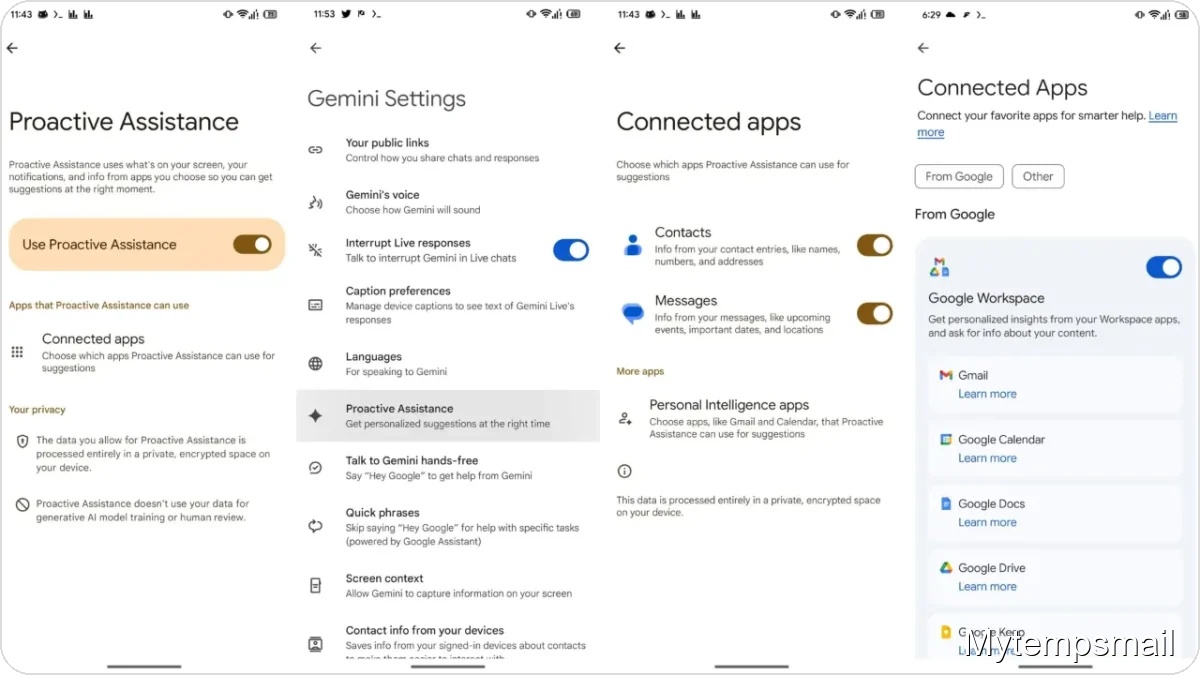
The feature appears in the Google app version 17.18.22.sa.arm64, where configuration menus are already visible. The concept is straightforward but technically ambitious: Gemini will analyze the context of what you are doing — reading an email, scrolling a messaging thread, or receiving a notification — and offer contextual suggestions before you realize you need them. If an email mentions dinner plans, the assistant might suggest creating a calendar event or show a map to the restaurant without forcing you to switch apps.
Three data sources Gemini will use
To make this possible, Google designed the system to pull from three main information sources that together create an accurate view of your immediate activity:
- On-screen content: Gemini analyzes visual and text elements in the apps you currently have open.
- Incoming notifications: The system monitors alerts that arrive in your notification panel to identify urgent tasks or relevant information.
- Connected apps: Deep integration with specific apps such as Contacts and Messages lets the assistant cross-reference personal details.
This level of integration builds on Google’s existing Personal Intelligence that links Gemini to Gmail, YouTube, and Photos. The key difference is initiative: the assistant will proactively surface quick insights or suggested actions at the exact moment they are useful.
Privacy handled on your device
When an AI reads your screen and watches notifications, privacy concerns are natural. Google is addressing this by processing the data locally.
According to the discovered documentation, all analysis performed by Proactive Assistance happens on your phone’s processor, inside a private, encrypted environment. Data is not sent to the cloud for model training and is not subject to human review. It is a closed system where information is processed to produce a suggestion and remains on the device. You will also have control over which apps Gemini can access through a dedicated settings menu, allowing you to enable or disable the feature with a tap.
Where this fits in Android’s future
There is no official launch date yet, but the advanced state of the user interface in the code suggests a public rollout could be near. This move positions Google to deepen AI integration on Android, aiming to make the OS not just a platform for running apps but one that understands user workflows.
The practical impact should be reduced friction. If the system detects an SMS confirmation code and places it directly into a browser field, or suggests a reminder based on an email you just read, you spend less time switching between menus. In short, this is AI trying to be useful in an invisible way.
